
Guide
VIVOSUN GrowHub A22 Setup: Pairing, Modes and Fixes
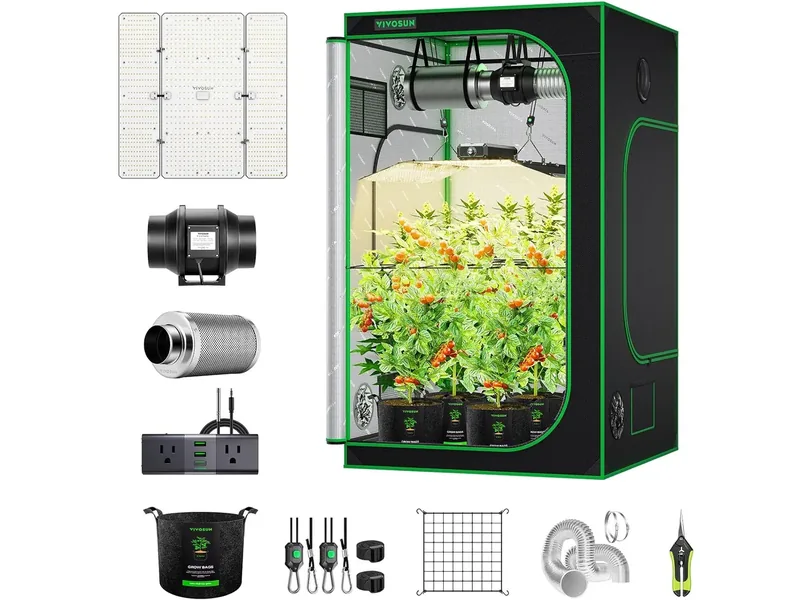
The GrowHub A22 is the small Wi-Fi box in the 4x4 Grow Tent Kit with 400W LED and GrowHub A22. It's a smart socket with a temperature and humidity probe. Whatever you plug into it can run on a schedule or a climate trigger from the Vivosun app. Pairing takes a few minutes, but there are a couple of traps. Everything below comes from VIVOSUN's A22 manual and GrowHub FAQ.
What's on the A22
| Part | What it does |
|---|---|
| Power socket | Powers and switches the device you plug in |
| Temperature & humidity interface | Where the sensor probe plugs in |
| Sensor probe | Reads conditions inside the tent |
| USB ports | 5V, 2A total |
| Power button | On/off, mode override and reset |
| LED indicator | Shows Wi-Fi and mode status |
The A22 takes 100 to 120 V at 60 Hz. It handles up to 15 A for general use, 10 A for a heater, and 1800 W for resistive loads. It works between -4°F and 113°F. VIVOSUN says it's for dry indoor use only and must never be hardwired.
Before you pair
- Find your router's 2.4 GHz network. The A22 doesn't connect to 5 GHz. Many routers show the two bands as separate names ending in "2.4GHz" and "5GHz", so pick the 2.4 GHz one.
- Turn on Bluetooth on your phone.
- Check your phone's time zone. VIVOSUN's FAQ says a GrowHub takes the time zone from your phone the first time it connects, and schedules run on that clock.
- Choose an outlet outside the tent, within 100 ft of the router, with as few walls and windows in between as possible.
Pairing, start to finish
- Plug the A22 into that outlet.
- Install the Vivosun app from the App Store or Google Play.
- In the app, tap "+" to add the GrowHub A22. The LED flashes white while it connects.
- Enter the 2.4 GHz network's password carefully.
- When it connects, rename the device. Then either create a new Garden or add the A22 to an existing one.
The A22 works alongside the GrowHub E42, E42A and E25 controllers. All controllers in the same Garden run the same recipe, so if you already own one, decide which Garden the A22 should join.
Reading the light
| LED | Meaning |
|---|---|
| Fast flashing white | Wi-Fi disconnected |
| Solid white | Connected, Manual mode |
| Solid green | Connected, Cycle, Auto or Recipe mode |
| Alternating white and green | Switching to Manual mode |
| Slow flashing green and white | Offline |
The LED switches off after about 5 seconds so it doesn't shine on the plants. To check the status, give the power button a short press.
What to plug in, and which mode to use
VIVOSUN's first example plugs the grow light into the A22 and runs it from the app. In the 4x4 kit, that's the LumaLight 400 W. The app gives you four ways to run the socket:
- Remote On/Off: switch it from your phone.
- Timer/Cycle: on and off at set times. This is the usual choice for a light.
- Auto: on and off at a set temperature or humidity. It needs a reading from the probe, so plug the probe in first.
- Recipe: runs by stage, schedule and climate together, alongside other devices in the same Garden.
On the A22 itself, a press turns the socket on or off. Holding the button for 3 seconds drops out of Cycle, Auto or Recipe into Manual mode. The light alternates white and green, then turns solid white.
For accurate Auto mode readings, VIVOSUN's FAQ advises hanging the sensor at the average canopy height, away from grow lights and fan outlets. For the exhaust fan and carbon filter themselves, see our VIVOSUN fan and filter setup guide.
When it won't connect
Is the network 2.4 GHz? This is the usual cause. Pick the 2.4 GHz name, not a combined or 5 GHz one.
Was the password right? Retype it on the pairing screen. VIVOSUN's FAQ names this as the second check.
Is it too far from the router? VIVOSUN asks for 100 ft or less, with few walls or windows in between. If the LED later shows slow green and white flashes, the A22 is offline, so look at the router's distance and obstructions first.
Still stuck? Hold the power button for 6 seconds. The LED flashing fast white confirms a factory reset. Then pair again from step 3. If that fails too, contact VIVOSUN support through the Vivosun app, and include the email you use to sign in.
If the Wi-Fi drops later, VIVOSUN says a GrowHub keeps running its last settings and reconnects on its own when the network comes back.
Building a smaller space? Grow Tent Sizes compares the dimensions. The LumaLight 200W LED Grow Light suits 2x4 and 3x3 tents, and the rest of the climate gear is on Lights, Fans & Climate.